






Designer introduction contact links CV UI design expert EdTech products designer visual designer
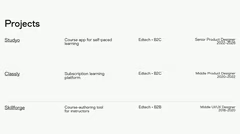
Projects list EdTech companies product designer roles job timeline
Visual design concept EdTech product development UI UX design
Studyo case study onboarding design learning app user retention increase
Visual design concept EdTech product development UI UX design
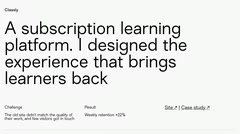
Classly case study subscription platform user engagement increase
Visual design concept EdTech product development UI UX design
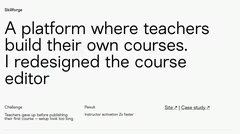
Skillforge case study course editor redesign instructor activation increase
About designer UI design EdTech intuitive scalable interfaces educational goals
Contact information designer website links copyright year

Design Portfolio

10 slides

Template for showcasing project work and achievements in EdTech and UI/UX design for designers and developers.

View template

About the template

Template for presenting professional achievements and project experience. It is suitable for designers, developers and other specialists to demonstrate their portfolio. The template includes text blocks, links and brief summaries of case studies.

Demonstrating professional achievements

The template helps professionals demonstrate their experience and project successes. It provides a structured layout that highlights key results. Designers and developers can use it to present their portfolio to clients or employers. Each slide can be devoted to a separate project, describing the difficulties encountered, the solutions proposed and the quantitative results achieved. For example, a UI/UX designer can show how user retention rates have improved after interface changes.

Organizing portfolio content

  • Start with a title slide with contact information and a short description of your professional activities.
  • Create separate slides for key projects, indicating the project name, your role, time frame and client details.
  • Add slides in the form of case studies that describe the problems faced, the solutions implemented and the results obtained.
  • End with a slide summarizing your professional skills and areas of expertise.
  • Add links to project websites, detailed case studies or other useful materials.

Using the template in various fields

Although the template is designed for EdTech and UI/UX design, it can be adapted to other areas. For example, software developers can use it to present their coding projects and technical achievements. Marketing specialists can demonstrate the results of advertising campaigns and key performance indicators. To make the template relevant to a specific industry, adjust the content to reflect the achievements and skills that are important to your target audience.

Improving the visual component

The template has a minimalist design that allows for flexible customization while keeping a professional look. Use high-quality images and icons to make the presentation more visual and break up large blocks of text. Make sure the fonts and color scheme are consistent throughout the presentation. Use charts and graphs to simplify the perception of complex data. Keep the text short and use bullet points to highlight the main facts. This will make the presentation visually attractive and easy to perceive.

Other ideas for your presentations

FAQ

  • What techniques help to cope with anxiety before a presentation?

    Take deep breaths, do breathing exercises, warm up your hands, get in a positive mood, and imagine yourself as a confident speaker. Rehearsals and preparation also significantly reduce anxiety.

  • What does a presentation consist of?

    Title slide. Table of contents. Section dividers. Summary. Conclusion.

  • How to use colors to highlight information?

    Use contrasting colors to emphasize key points. Avoid overloading slides with bright shades and maintain a consistent design style. Colors should aid understanding, not distract.

  • What does it mean to create a presentation?

    A presentation is a way of delivering information to an audience in a clear and accessible manner, without overwhelming them with new knowledge. A good presentation should be easy to understand, and this can be achieved using various software tools.

  • What is the 5/5/5 rule for presentations?

    The 5/5/5 rule is a popular recommendation for text formatting on slides. It states: use no more than five lines of text per slide, no more than five words per line, and avoid more than five text-heavy slides in a row. This helps maintain conciseness and hold the audience's attention.